<?xml version="1.0" encoding="utf-8"?>
<feed xmlns="http://www.w3.org/2005/Atom">
  <title>暂无-Tech木屋~</title>
  
  <subtitle>熟悉-反复</subtitle>
  <link href="https://yelsonli.github.io/atom.xml" rel="self"/>
  
  <link href="https://yelsonli.github.io/"/>
  <updated>2022-03-28T08:14:40.429Z</updated>
  <id>https://yelsonli.github.io/</id>
  
  <author>
    <name>Yelson Li</name>
    
  </author>
  
  <generator uri="https://hexo.io/">Hexo</generator>
  
  <entry>
    <title>JetBrains-代码颜色设置</title>
    <link href="https://yelsonli.github.io/2022/03/28/JetBrains-%E4%BB%A3%E7%A0%81%E9%A2%9C%E8%89%B2%E8%AE%BE%E7%BD%AE/"/>
    <id>https://yelsonli.github.io/2022/03/28/JetBrains-%E4%BB%A3%E7%A0%81%E9%A2%9C%E8%89%B2%E8%AE%BE%E7%BD%AE/</id>
    <published>2022-03-28T08:10:11.000Z</published>
    <updated>2022-03-28T08:14:40.429Z</updated>
    
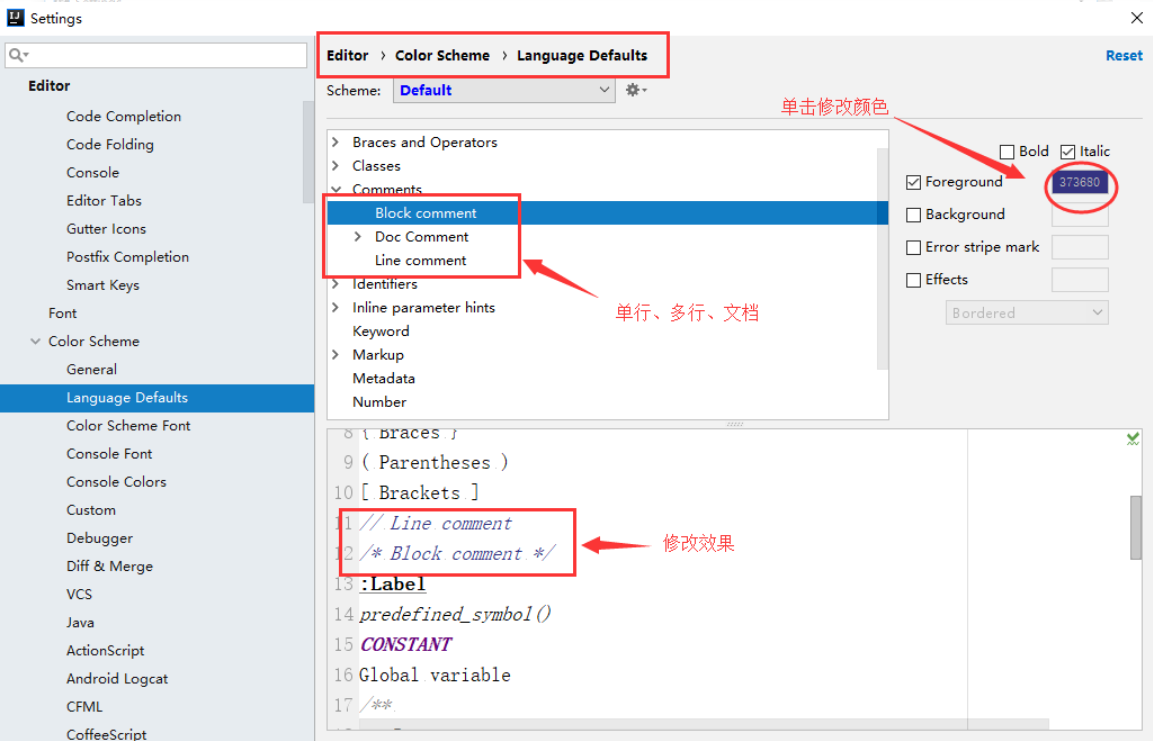
    <content type="html"><![CDATA[<figure class="highlight bash"><table><tr><td class="gutter"><pre><span class="line">1</span><br></pre></td><td class="code"><pre><span class="line">Setting--&gt;Editor--&gt;Color Scheme --&gt;Language Defaults</span><br></pre></td></tr></table></figure><p>Comments目录下</p><figure class="highlight bash"><table><tr><td class="gutter"><pre><span class="line">1</span><br><span class="line">2</span><br><span class="line">3</span><br></pre></td><td class="code"><pre><span class="line">Block comment// 多行注释 /* */</span><br><span class="line">Line comment // 单行注释 //</span><br><span class="line">Doc Comment// 文档文件 /** */</span><br></pre></td></tr></table></figure><p>找不到可以关键字搜索(如Language)</p><p><img src="/2022/03/28/JetBrains-%E4%BB%A3%E7%A0%81%E9%A2%9C%E8%89%B2%E8%AE%BE%E7%BD%AE/image-20220328161435328.png" alt="image-20220328161435328"></p>]]></content>
    
    
    <summary type="html">JetBrains-代码颜色相关设置</summary>


    <category term="IDE" scheme="https://yelsonli.github.io/categories/IDE/"/>
    
    <category term="JetBrains" scheme="https://yelsonli.github.io/categories/IDE/JetBrains/"/>
    
    
    <category term="JetBrains" scheme="https://yelsonli.github.io/tags/JetBrains/"/>
    
  </entry>
  
  <entry>
    <title>Git fatal: refusing to merge unrelated histories</title>
    <link href="https://yelsonli.github.io/2022/03/22/Git-fatal-refusing-to-merge-unrelated-histories/"/>
    <id>https://yelsonli.github.io/2022/03/22/Git-fatal-refusing-to-merge-unrelated-histories/</id>
    <published>2022-03-22T11:47:26.000Z</published>
    <updated>2022-03-26T14:52:58.695Z</updated>
    
    <content type="html"><![CDATA[<p><strong>解决：</strong></p><figure class="highlight bash"><table><tr><td class="gutter"><pre><span class="line">1</span><br></pre></td><td class="code"><pre><span class="line">git merge &lt;branch&gt; --allow-unrelated-histories</span><br></pre></td></tr></table></figure><p><strong>很可能还需要：</strong></p><figure class="highlight bash"><table><tr><td class="gutter"><pre><span class="line">1</span><br><span class="line">2</span><br><span class="line">3</span><br></pre></td><td class="code"><pre><span class="line">upstream</span><br><span class="line"><span class="comment"># 并</span></span><br><span class="line">git push -f</span><br></pre></td></tr></table></figure>]]></content>
    
    
    <summary type="html">解决Git fatal: refusing to merge unrelated histories</summary>


    <category term="技术" scheme="https://yelsonli.github.io/categories/%E6%8A%80%E6%9C%AF/"/>
    
    <category term="Git" scheme="https://yelsonli.github.io/categories/%E6%8A%80%E6%9C%AF/Git/"/>
    
    
    <category term="Git" scheme="https://yelsonli.github.io/tags/Git/"/>
    
  </entry>
  
  <entry>
    <title>Git-Reset</title>
    <link href="https://yelsonli.github.io/2022/03/22/Git-Reset/"/>
    <id>https://yelsonli.github.io/2022/03/22/Git-Reset/</id>
    <published>2022-03-22T11:36:43.000Z</published>
    <updated>2022-03-26T14:53:04.085Z</updated>
    
    <content type="html"><![CDATA[<h3 id="git-reset"><a href="#git-reset" class="headerlink" title="git reset"></a>git reset</h3><figure class="highlight bash"><table><tr><td class="gutter"><pre><span class="line">1</span><br></pre></td><td class="code"><pre><span class="line">git reset<span class="comment"># 将执行git add操作的(暂存区)中的文件清空</span></span><br></pre></td></tr></table></figure>]]></content>
    
    
    <summary type="html">Git Reset命令场景使用</summary>


    <category term="技术" scheme="https://yelsonli.github.io/categories/%E6%8A%80%E6%9C%AF/"/>
    
    <category term="Git" scheme="https://yelsonli.github.io/categories/%E6%8A%80%E6%9C%AF/Git/"/>
    
    
    <category term="Git" scheme="https://yelsonli.github.io/tags/Git/"/>
    
  </entry>
  
  <entry>
    <title>Git-Clone-Pull-Push-仓库/分支关联(初始部分)</title>
    <link href="https://yelsonli.github.io/2022/03/22/Git-Clone-Push-Pull-%E5%88%9D%E5%A7%8B%E5%8C%96%E7%9B%B8%E5%85%B3/"/>
    <id>https://yelsonli.github.io/2022/03/22/Git-Clone-Push-Pull-%E5%88%9D%E5%A7%8B%E5%8C%96%E7%9B%B8%E5%85%B3/</id>
    <published>2022-03-22T11:15:54.000Z</published>
    <updated>2022-03-27T00:25:32.966Z</updated>
    
    <content type="html"><![CDATA[<h1 id="git-clone"><a href="#git-clone" class="headerlink" title="git clone"></a>git clone</h1><figure class="highlight bash"><table><tr><td class="gutter"><pre><span class="line">1</span><br></pre></td><td class="code"><pre><span class="line">git <span class="built_in">clone</span> &lt;版本库url&gt;</span><br></pre></td></tr></table></figure><h4 id="如果不想让远程仓库和本地目录同名"><a href="#如果不想让远程仓库和本地目录同名" class="headerlink" title="如果不想让远程仓库和本地目录同名:"></a>如果不想让远程仓库和本地目录同名:</h4><figure class="highlight bash"><table><tr><td class="gutter"><pre><span class="line">1</span><br></pre></td><td class="code"><pre><span class="line">git <span class="built_in">clone</span> &lt;版本库url&gt; &lt;本地目录名&gt;</span><br></pre></td></tr></table></figure><h1 id="git-pull"><a href="#git-pull" class="headerlink" title="git pull"></a>git pull</h1><p>git pull是<strong>拉取远程分支</strong>并<strong>更新到本地仓库</strong>的操作</p><p>用于需要把新内容下载下来</p><p>事实上就是: git pull 从远程仓库获取最新版本，再与本地分支merge</p><p>注: git fetch<strong>不会</strong>进行merge, 如果需要则<strong>必须手动merge</strong></p><figure class="highlight bash"><table><tr><td class="gutter"><pre><span class="line">1</span><br></pre></td><td class="code"><pre><span class="line">git pull = git fetch + git merge<span class="comment"># git merge 是让指定(想要选中)的branch合并(merge)到当前你所在的分支</span></span><br></pre></td></tr></table></figure><p><strong>git pull 常用场景用法:</strong></p><figure class="highlight bash"><table><tr><td class="gutter"><pre><span class="line">1</span><br><span class="line">2</span><br></pre></td><td class="code"><pre><span class="line">git fetch origin main:branchtest</span><br><span class="line">git merge branchtest</span><br></pre></td></tr></table></figure><p><strong>若用git fetch操作(常用)</strong></p><figure class="highlight bash"><table><tr><td class="gutter"><pre><span class="line">1</span><br><span class="line">2</span><br></pre></td><td class="code"><pre><span class="line">git fetch origin main:branchtest</span><br><span class="line">git merge branchtest</span><br></pre></td></tr></table></figure><h1 id="本地仓库添加-关联-远程仓库"><a href="#本地仓库添加-关联-远程仓库" class="headerlink" title="本地仓库添加(关联)远程仓库"></a>本地仓库添加(关联)远程仓库</h1><p><strong>查看本地仓库和远程仓库的关联详情</strong></p><p><strong>关联详情！！！</strong></p><p><strong>关联详情！！！</strong></p><p><strong>关联详情！！！</strong></p><figure class="highlight bash"><table><tr><td class="gutter"><pre><span class="line">1</span><br></pre></td><td class="code"><pre><span class="line">git remote -v</span><br></pre></td></tr></table></figure><p><strong>本地Git关联(添加)远程库</strong></p><figure class="highlight bash"><table><tr><td class="gutter"><pre><span class="line">1</span><br></pre></td><td class="code"><pre><span class="line">git remote add origin &lt;远程库url&gt;</span><br></pre></td></tr></table></figure><p><strong>添加(关联)后，第一次要push或者pull</strong></p><figure class="highlight bash"><table><tr><td class="gutter"><pre><span class="line">1</span><br></pre></td><td class="code"><pre><span class="line">git push -u origin main<span class="comment"># -u参数不但会推送，还会将本地分支和远程分支关联起来，以后推送或拉取就可以简化命令</span></span><br></pre></td></tr></table></figure><p><strong>解除远程仓库和本地仓库的关联</strong></p><figure class="highlight bash"><table><tr><td class="gutter"><pre><span class="line">1</span><br><span class="line">2</span><br><span class="line">3</span><br></pre></td><td class="code"><pre><span class="line">git remote <span class="built_in">rm</span> &lt;远程仓库名&gt;</span><br><span class="line"><span class="comment"># 例：</span></span><br><span class="line">git remote <span class="built_in">rm</span> origin</span><br></pre></td></tr></table></figure><p><strong>本地分支 与 远程分支 建立关联</strong></p><figure class="highlight bash"><table><tr><td class="gutter"><pre><span class="line">1</span><br><span class="line">2</span><br><span class="line">3</span><br><span class="line">4</span><br><span class="line">5</span><br></pre></td><td class="code"><pre><span class="line">git push -u origin &lt;远程分支名&gt;</span><br><span class="line"><span class="comment"># 或</span></span><br><span class="line">git push --set-upstream origin &lt;远程分支名&gt;</span><br><span class="line"><span class="comment"># 或</span></span><br><span class="line">git branch --set-upstream-to=origin/&lt;远程分支名&gt; &lt;本地分支名&gt;</span><br></pre></td></tr></table></figure><p><strong>解除当前分支关联</strong></p><figure class="highlight bash"><table><tr><td class="gutter"><pre><span class="line">1</span><br></pre></td><td class="code"><pre><span class="line">git branch --unset-upstream</span><br></pre></td></tr></table></figure>]]></content>
    
    
    <summary type="html">git clone相关命令使用(持续更新)</summary>


    <category term="技术" scheme="https://yelsonli.github.io/categories/%E6%8A%80%E6%9C%AF/"/>
    
    <category term="Git" scheme="https://yelsonli.github.io/categories/%E6%8A%80%E6%9C%AF/Git/"/>
    
    
    <category term="Git" scheme="https://yelsonli.github.io/tags/Git/"/>
    
  </entry>
  
  <entry>
    <title>Linux-内存-显存-硬盘</title>
    <link href="https://yelsonli.github.io/2022/03/22/Linux-%E5%86%85%E5%AD%98-%E6%98%BE%E5%AD%98-%E7%A1%AC%E7%9B%98/"/>
    <id>https://yelsonli.github.io/2022/03/22/Linux-%E5%86%85%E5%AD%98-%E6%98%BE%E5%AD%98-%E7%A1%AC%E7%9B%98/</id>
    <published>2022-03-22T11:04:29.000Z</published>
    <updated>2022-03-26T14:53:32.767Z</updated>
    
    <content type="html"><![CDATA[<h3 id="Linux-显存"><a href="#Linux-显存" class="headerlink" title="Linux 显存"></a>Linux 显存</h3><p><strong>查看nvidia显存</strong></p><figure class="highlight bash"><table><tr><td class="gutter"><pre><span class="line">1</span><br></pre></td><td class="code"><pre><span class="line">nvidia-smi</span><br></pre></td></tr></table></figure><p>(持续更新ing</p>]]></content>
    
    
    <summary type="html">Linux-内存-显存-硬盘相关命令</summary>


    <category term="技术" scheme="https://yelsonli.github.io/categories/%E6%8A%80%E6%9C%AF/"/>
    
    <category term="Linux" scheme="https://yelsonli.github.io/categories/%E6%8A%80%E6%9C%AF/Linux/"/>
    
    <category term="内存" scheme="https://yelsonli.github.io/categories/%E6%8A%80%E6%9C%AF/Linux/%E5%86%85%E5%AD%98/"/>
    
    <category term="显存" scheme="https://yelsonli.github.io/categories/%E6%8A%80%E6%9C%AF/Linux/%E5%86%85%E5%AD%98/%E6%98%BE%E5%AD%98/"/>
    
    <category term="硬盘" scheme="https://yelsonli.github.io/categories/%E6%8A%80%E6%9C%AF/Linux/%E5%86%85%E5%AD%98/%E6%98%BE%E5%AD%98/%E7%A1%AC%E7%9B%98/"/>
    
    
    <category term="Linux" scheme="https://yelsonli.github.io/tags/Linux/"/>
    
  </entry>
  
  <entry>
    <title>Linux-云服务器</title>
    <link href="https://yelsonli.github.io/2022/03/22/Linux-%E4%BA%91%E6%9C%8D%E5%8A%A1%E5%99%A8/"/>
    <id>https://yelsonli.github.io/2022/03/22/Linux-%E4%BA%91%E6%9C%8D%E5%8A%A1%E5%99%A8/</id>
    <published>2022-03-22T10:55:03.000Z</published>
    <updated>2022-03-26T14:29:13.013Z</updated>
    
    <content type="html"><![CDATA[<h3 id="Linux-云服务器"><a href="#Linux-云服务器" class="headerlink" title="Linux 云服务器"></a>Linux 云服务器</h3><p><strong>查JDK安装目录</strong></p><figure class="highlight bash"><table><tr><td class="gutter"><pre><span class="line">1</span><br><span class="line">2</span><br><span class="line">3</span><br></pre></td><td class="code"><pre><span class="line"><span class="built_in">ls</span> -l /etc/alternatives/java</span><br><span class="line"><span class="comment"># 或者</span></span><br><span class="line">$(<span class="built_in">dirname</span> $(<span class="built_in">dirname</span> $(<span class="built_in">realpath</span> $(<span class="built_in">which</span> javac))))</span><br></pre></td></tr></table></figure><p><strong>Redis</strong></p><p><strong># Redis配置文件路径</strong></p><figure class="highlight bash"><table><tr><td class="gutter"><pre><span class="line">1</span><br></pre></td><td class="code"><pre><span class="line">/etc/redis/redis.conf</span><br></pre></td></tr></table></figure><p><strong># Redis服务命令</strong></p><figure class="highlight bash"><table><tr><td class="gutter"><pre><span class="line">1</span><br><span class="line">2</span><br><span class="line">3</span><br><span class="line">4</span><br><span class="line">5</span><br><span class="line">6</span><br><span class="line">7</span><br><span class="line">8</span><br></pre></td><td class="code"><pre><span class="line"><span class="comment"># 检查Redis服务的状态</span></span><br><span class="line">sudo systemctl status redis-server</span><br><span class="line"><span class="comment"># 重启redis</span></span><br><span class="line">sudo systemctl restart redis-server</span><br><span class="line"><span class="comment"># 验证 Redis 服务器正在监听端口6379</span></span><br><span class="line">ss -an | grep 6379</span><br><span class="line"><span class="comment"># 使用redis-cli从你的远程机器上 ping 一下 Redis 服务器</span></span><br><span class="line">redis-cli -h &lt;REDIS_IP_ADDRESS&gt; ping</span><br></pre></td></tr></table></figure><p><strong>Openresty</strong></p><p><strong># 应用安装路径</strong></p><figure class="highlight bash"><table><tr><td class="gutter"><pre><span class="line">1</span><br></pre></td><td class="code"><pre><span class="line">/usr/local/openresty</span><br></pre></td></tr></table></figure><p><strong># openresty相关命令</strong></p><figure class="highlight bash"><table><tr><td class="gutter"><pre><span class="line">1</span><br><span class="line">2</span><br><span class="line">3</span><br><span class="line">4</span><br><span class="line">5</span><br><span class="line">6</span><br><span class="line">7</span><br><span class="line">8</span><br><span class="line">9</span><br><span class="line">10</span><br></pre></td><td class="code"><pre><span class="line"></span><br><span class="line"><span class="comment"># 目录 /usr/local/openresty/nginx/</span></span><br><span class="line">--启动</span><br><span class="line">/usr/local/openresty/nginx/sbin/nginx</span><br><span class="line">--停止</span><br><span class="line">/usr/local/openresty/nginx/sbin/nginx -s stop</span><br><span class="line">--重启</span><br><span class="line">/usr/local/openresty/nginx/sbin/nginx -s reload</span><br><span class="line">--检验nginx配置是否正确</span><br><span class="line">/usr/local/openresty/nginx/sbin/nginx -t</span><br></pre></td></tr></table></figure><p><strong>Mysql</strong></p><p><strong># Mysql配置文件路径</strong></p><figure class="highlight bash"><table><tr><td class="gutter"><pre><span class="line">1</span><br></pre></td><td class="code"><pre><span class="line">/etc/mysql/</span><br></pre></td></tr></table></figure><figure class="highlight bash"><table><tr><td class="gutter"><pre><span class="line">1</span><br><span class="line">2</span><br><span class="line">3</span><br><span class="line">4</span><br></pre></td><td class="code"><pre><span class="line"><span class="comment"># mysql相关命令</span></span><br><span class="line">sudo service mysql start</span><br><span class="line">sudo service mysql stop</span><br><span class="line">sudo service mysql restart</span><br></pre></td></tr></table></figure><p><strong>Ubuntu ufw防火墙</strong></p><figure class="highlight bash"><table><tr><td class="gutter"><pre><span class="line">1</span><br><span class="line">2</span><br></pre></td><td class="code"><pre><span class="line">sudo ufw <span class="built_in">enable</span></span><br><span class="line">sudo ufw <span class="built_in">disable</span></span><br></pre></td></tr></table></figure>]]></content>
    
    
    <summary type="html">Linux-云服务器相关命令</summary>


    <category term="技术" scheme="https://yelsonli.github.io/categories/%E6%8A%80%E6%9C%AF/"/>
    
    <category term="Linux" scheme="https://yelsonli.github.io/categories/%E6%8A%80%E6%9C%AF/Linux/"/>
    
    <category term="云服务器" scheme="https://yelsonli.github.io/categories/%E6%8A%80%E6%9C%AF/Linux/%E4%BA%91%E6%9C%8D%E5%8A%A1%E5%99%A8/"/>
    
    
    <category term="Linux" scheme="https://yelsonli.github.io/tags/Linux/"/>
    
  </entry>
  
  <entry>
    <title>Linux-端口-进程</title>
    <link href="https://yelsonli.github.io/2022/03/22/Linux-%E7%AB%AF%E5%8F%A3-%E8%BF%9B%E7%A8%8B/"/>
    <id>https://yelsonli.github.io/2022/03/22/Linux-%E7%AB%AF%E5%8F%A3-%E8%BF%9B%E7%A8%8B/</id>
    <published>2022-03-22T10:49:55.000Z</published>
    <updated>2022-03-26T14:53:27.498Z</updated>
    
    <content type="html"><![CDATA[<h3 id="Linux-端口-进程"><a href="#Linux-端口-进程" class="headerlink" title="Linux-端口-进程"></a>Linux-端口-进程</h3><p><strong>查看某端口号进程</strong></p><figure class="highlight bash"><table><tr><td class="gutter"><pre><span class="line">1</span><br><span class="line">2</span><br><span class="line">3</span><br><span class="line">4</span><br></pre></td><td class="code"><pre><span class="line">netstat -atunp | grep &lt;port&gt;</span><br><span class="line"><span class="comment"># 通过nginx进程pid查看占用端口（进程pid）</span></span><br><span class="line">命令：</span><br><span class="line">netstat -nap | grep &lt;pid&gt;</span><br></pre></td></tr></table></figure><p><strong>kill进程</strong></p><figure class="highlight bash"><table><tr><td class="gutter"><pre><span class="line">1</span><br></pre></td><td class="code"><pre><span class="line"><span class="built_in">kill</span> -9 &lt;进程号&gt;</span><br></pre></td></tr></table></figure><p><strong>查看当前进程</strong></p><figure class="highlight bash"><table><tr><td class="gutter"><pre><span class="line">1</span><br><span class="line">2</span><br><span class="line">3</span><br><span class="line">4</span><br></pre></td><td class="code"><pre><span class="line">ps -ef</span><br><span class="line"><span class="comment"># 例如 查看nginx进程pid：</span></span><br><span class="line">命令：<span class="comment"># 查看某进程</span></span><br><span class="line">ps -ef | grep nginx</span><br></pre></td></tr></table></figure>]]></content>
    
    
    <summary type="html">Linux-端口与进程相关命令</summary>


    <category term="技术" scheme="https://yelsonli.github.io/categories/%E6%8A%80%E6%9C%AF/"/>
    
    <category term="Linux" scheme="https://yelsonli.github.io/categories/%E6%8A%80%E6%9C%AF/Linux/"/>
    
    <category term="端口" scheme="https://yelsonli.github.io/categories/%E6%8A%80%E6%9C%AF/Linux/%E7%AB%AF%E5%8F%A3/"/>
    
    <category term="进程" scheme="https://yelsonli.github.io/categories/%E6%8A%80%E6%9C%AF/Linux/%E7%AB%AF%E5%8F%A3/%E8%BF%9B%E7%A8%8B/"/>
    
    
    <category term="Linux" scheme="https://yelsonli.github.io/tags/Linux/"/>
    
  </entry>
  
  <entry>
    <title>linux-cp命令</title>
    <link href="https://yelsonli.github.io/2022/03/10/Linux-cp-%E5%91%BD%E4%BB%A4/"/>
    <id>https://yelsonli.github.io/2022/03/10/Linux-cp-%E5%91%BD%E4%BB%A4/</id>
    <published>2022-03-10T14:55:25.000Z</published>
    <updated>2022-03-26T14:53:22.238Z</updated>
    
    <content type="html"><![CDATA[<h3 id="Linux-cp-命令"><a href="#Linux-cp-命令" class="headerlink" title="Linux- cp 命令"></a>Linux- cp 命令</h3><p><strong>复制cp命令</strong></p><figure class="highlight bash"><table><tr><td class="gutter"><pre><span class="line">1</span><br><span class="line">2</span><br><span class="line">3</span><br></pre></td><td class="code"><pre><span class="line"><span class="built_in">cp</span> -r source_path destination_path</span><br><span class="line"><span class="built_in">cp</span> -r xxx/. xxx/ <span class="comment"># 递归复制source_path下所有文件，不包括源文件夹</span></span><br><span class="line"><span class="built_in">cp</span> -r xxx xxx/ <span class="comment"># 递归复制source_path下所有文件，包括源文件夹</span></span><br></pre></td></tr></table></figure>]]></content>
    
    
    <summary type="html">Linux-cp命令</summary>


    <category term="技术" scheme="https://yelsonli.github.io/categories/%E6%8A%80%E6%9C%AF/"/>
    
    <category term="Linux" scheme="https://yelsonli.github.io/categories/%E6%8A%80%E6%9C%AF/Linux/"/>
    
    <category term="cp" scheme="https://yelsonli.github.io/categories/%E6%8A%80%E6%9C%AF/Linux/cp/"/>
    
    
    <category term="Linux" scheme="https://yelsonli.github.io/tags/Linux/"/>
    
  </entry>
  
  <entry>
    <title>IDEA-gitignore模板</title>
    <link href="https://yelsonli.github.io/2022/02/23/idea-gitignore%E6%A8%A1%E6%9D%BF/"/>
    <id>https://yelsonli.github.io/2022/02/23/idea-gitignore%E6%A8%A1%E6%9D%BF/</id>
    <published>2022-02-23T09:30:51.000Z</published>
    <updated>2022-03-26T14:53:17.039Z</updated>
    
    <content type="html"><![CDATA[<figure class="highlight bash"><table><tr><td class="gutter"><pre><span class="line">1</span><br><span class="line">2</span><br><span class="line">3</span><br><span class="line">4</span><br><span class="line">5</span><br><span class="line">6</span><br><span class="line">7</span><br><span class="line">8</span><br><span class="line">9</span><br><span class="line">10</span><br><span class="line">11</span><br><span class="line">12</span><br><span class="line">13</span><br><span class="line">14</span><br><span class="line">15</span><br><span class="line">16</span><br><span class="line">17</span><br><span class="line">18</span><br><span class="line">19</span><br><span class="line">20</span><br><span class="line">21</span><br><span class="line">22</span><br><span class="line">23</span><br><span class="line">24</span><br><span class="line">25</span><br><span class="line">26</span><br><span class="line">27</span><br><span class="line">28</span><br><span class="line">29</span><br><span class="line">30</span><br><span class="line">31</span><br><span class="line">32</span><br><span class="line">33</span><br><span class="line">34</span><br><span class="line">35</span><br><span class="line">36</span><br><span class="line">37</span><br><span class="line">38</span><br><span class="line">39</span><br><span class="line">40</span><br><span class="line">41</span><br><span class="line">42</span><br><span class="line">43</span><br><span class="line">44</span><br><span class="line">45</span><br></pre></td><td class="code"><pre><span class="line">HELP.md</span><br><span class="line"><span class="built_in">log</span>/history.log</span><br><span class="line">target/</span><br><span class="line">!.mvn/wrapper/maven-wrapper.jar</span><br><span class="line">!**/src/main/**/target/</span><br><span class="line">!**/src/test/**/target/</span><br><span class="line"></span><br><span class="line"><span class="comment">### Mac ###</span></span><br><span class="line">.DS_Store</span><br><span class="line"></span><br><span class="line"><span class="comment">### Default ignored files ###</span></span><br><span class="line">/shelf/</span><br><span class="line">/workspace.xml</span><br><span class="line"></span><br><span class="line"><span class="comment">### STS ###</span></span><br><span class="line">.apt_generated</span><br><span class="line">.classpath</span><br><span class="line">.factorypath</span><br><span class="line">.project</span><br><span class="line">.settings</span><br><span class="line">.springBeans</span><br><span class="line">.sts4-cache</span><br><span class="line"></span><br><span class="line"><span class="comment">### IntelliJ IDEA ###</span></span><br><span class="line">.idea</span><br><span class="line">*.iws</span><br><span class="line">*.iml</span><br><span class="line">*.ipr</span><br><span class="line"></span><br><span class="line"><span class="comment">### NetBeans ###</span></span><br><span class="line">/nbproject/private/</span><br><span class="line">/nbbuild/</span><br><span class="line">/dist/</span><br><span class="line">/nbdist/</span><br><span class="line">/.nb-gradle/</span><br><span class="line">build/</span><br><span class="line">!**/src/main/**/build/</span><br><span class="line">!**/src/test/**/build/</span><br><span class="line"></span><br><span class="line"><span class="comment">### VS Code ###</span></span><br><span class="line">.vscode/</span><br><span class="line"></span><br><span class="line"><span class="comment">### Editor-based HTTP Client requests ###</span></span><br><span class="line">/httpRequests/</span><br><span class="line"></span><br></pre></td></tr></table></figure>]]></content>
    
    
    <summary type="html">IDEA-.gitignore模板</summary>


    <category term="技术" scheme="https://yelsonli.github.io/categories/%E6%8A%80%E6%9C%AF/"/>
    
    <category term="Git" scheme="https://yelsonli.github.io/categories/%E6%8A%80%E6%9C%AF/Git/"/>
    
    
    <category term="Git" scheme="https://yelsonli.github.io/tags/Git/"/>
    
  </entry>
  
  <entry>
    <title>Git-Branch</title>
    <link href="https://yelsonli.github.io/2022/02/23/Git-Branch/"/>
    <id>https://yelsonli.github.io/2022/02/23/Git-Branch/</id>
    <published>2022-02-23T08:02:54.000Z</published>
    <updated>2022-03-26T14:52:46.948Z</updated>
    
    <content type="html"><![CDATA[<h3 id="git-branch"><a href="#git-branch" class="headerlink" title="git branch"></a>git branch</h3><figure class="highlight bash"><table><tr><td class="gutter"><pre><span class="line">1</span><br><span class="line">2</span><br><span class="line">3</span><br><span class="line">4</span><br><span class="line">5</span><br></pre></td><td class="code"><pre><span class="line">git branch<span class="comment"># 查看本地当前有哪些分支，且显示当前所在分支</span></span><br><span class="line">git branch -a       <span class="comment"># 查看所有分支，包括远端，且显示track关系</span></span><br><span class="line">git branch -v<span class="comment"># 查看本地分支，以及分支上最新的commit提交信息</span></span><br><span class="line">git branch -vv   <span class="comment"># 在-v基础上，多实现本地分支和远程分支的关联关系</span></span><br><span class="line">git branch &lt;新分支名&gt;<span class="comment"># 创建一个新的分支</span></span><br></pre></td></tr></table></figure><p><strong>修改分支名</strong></p><figure class="highlight bash"><table><tr><td class="gutter"><pre><span class="line">1</span><br></pre></td><td class="code"><pre><span class="line">git branch -m &lt;旧分支名&gt; &lt;新分支名&gt;</span><br></pre></td></tr></table></figure><p><strong>删除本地分支</strong></p><figure class="highlight bash"><table><tr><td class="gutter"><pre><span class="line">1</span><br></pre></td><td class="code"><pre><span class="line">git branch -d &lt;本地某个branch名&gt;</span><br></pre></td></tr></table></figure><p><strong>删除远程分支</strong></p><figure class="highlight bash"><table><tr><td class="gutter"><pre><span class="line">1</span><br></pre></td><td class="code"><pre><span class="line">git push origin --delete &lt;远程分支名&gt;</span><br></pre></td></tr></table></figure>]]></content>
    
    
    <summary type="html">Git Branch使用场景(持续更新)</summary>


    <category term="技术" scheme="https://yelsonli.github.io/categories/%E6%8A%80%E6%9C%AF/"/>
    
    <category term="Git" scheme="https://yelsonli.github.io/categories/%E6%8A%80%E6%9C%AF/Git/"/>
    
    
    <category term="Git" scheme="https://yelsonli.github.io/tags/Git/"/>
    
  </entry>
  
  <entry>
    <title>DeTravel</title>
    <link href="https://yelsonli.github.io/2022/02/20/DeTravel/"/>
    <id>https://yelsonli.github.io/2022/02/20/DeTravel/</id>
    <published>2022-02-19T18:15:41.000Z</published>
    <updated>2022-03-26T14:52:39.882Z</updated>
    
    <content type="html"><![CDATA[<h3 id="调试过程很艰难，呜呜呜"><a href="#调试过程很艰难，呜呜呜" class="headerlink" title="调试过程很艰难，呜呜呜"></a>调试过程很艰难，呜呜呜</h3><p><img src="/2022/02/20/DeTravel/image-20220220225346079.png" alt="image-20220220225346079"></p><figure class="highlight python"><table><tr><td class="gutter"><pre><span class="line">1</span><br></pre></td><td class="code"><pre><span class="line">pirntf(<span class="string">&quot;hello world&quot;</span>)</span><br></pre></td></tr></table></figure>]]></content>
    
    
    <summary type="html">调试</summary>


    <category term="开端" scheme="https://yelsonli.github.io/categories/%E5%BC%80%E7%AB%AF/"/>
    
    
    <category term="旅程" scheme="https://yelsonli.github.io/tags/%E6%97%85%E7%A8%8B/"/>
    
    <category term="探索" scheme="https://yelsonli.github.io/tags/%E6%8E%A2%E7%B4%A2/"/>
    
  </entry>
  
  <entry>
    <title>Hello World</title>
    <link href="https://yelsonli.github.io/2022/02/19/hello-world/"/>
    <id>https://yelsonli.github.io/2022/02/19/hello-world/</id>
    <published>2022-02-19T14:53:04.999Z</published>
    <updated>2022-03-23T03:06:16.471Z</updated>
    
    <content type="html"><![CDATA[<p>Welcome to <a href="https://hexo.io/">Hexo</a>! This is your very first post. Check <a href="https://hexo.io/docs/">documentation</a> for more info. If you get any problems when using Hexo, you can find the answer in <a href="https://hexo.io/docs/troubleshooting.html">troubleshooting</a> or you can ask me on <a href="https://github.com/hexojs/hexo/issues">GitHub</a>.</p><h2 id="Quick-Start"><a href="#Quick-Start" class="headerlink" title="Quick Start"></a>Quick Start</h2><h3 id="Create-a-new-post"><a href="#Create-a-new-post" class="headerlink" title="Create a new post"></a>Create a new post</h3><figure class="highlight bash"><table><tr><td class="gutter"><pre><span class="line">1</span><br></pre></td><td class="code"><pre><span class="line">$ hexo new <span class="string">&quot;My New Post&quot;</span></span><br></pre></td></tr></table></figure><p>More info: <a href="https://hexo.io/docs/writing.html">Writing</a></p><h3 id="Run-server"><a href="#Run-server" class="headerlink" title="Run server"></a>Run server</h3><figure class="highlight bash"><table><tr><td class="gutter"><pre><span class="line">1</span><br></pre></td><td class="code"><pre><span class="line">$ hexo server</span><br></pre></td></tr></table></figure><p>More info: <a href="https://hexo.io/docs/server.html">Server</a></p><h3 id="Generate-static-files"><a href="#Generate-static-files" class="headerlink" title="Generate static files"></a>Generate static files</h3><figure class="highlight bash"><table><tr><td class="gutter"><pre><span class="line">1</span><br></pre></td><td class="code"><pre><span class="line">$ hexo generate</span><br></pre></td></tr></table></figure><p>More info: <a href="https://hexo.io/docs/generating.html">Generating</a></p><h3 id="Deploy-to-remote-sites"><a href="#Deploy-to-remote-sites" class="headerlink" title="Deploy to remote sites"></a>Deploy to remote sites</h3><figure class="highlight bash"><table><tr><td class="gutter"><pre><span class="line">1</span><br></pre></td><td class="code"><pre><span class="line">$ hexo deploy</span><br></pre></td></tr></table></figure><p>More info: <a href="https://hexo.io/docs/one-command-deployment.html">Deployment</a></p>]]></content>


    <summary type="html">&lt;p&gt;Welcome to &lt;a href=&quot;https://hexo.io/&quot;&gt;Hexo&lt;/a&gt;! This is your very first post. Check &lt;a href=&quot;https://hexo.io/docs/&quot;&gt;documentation&lt;/a&gt; for</summary>


  </entry>
  
</feed>